
Stop typing test data.
DevFiller fills the form you're testing with realistic, fictional data in one click. It never submits anything, and it works without an account.
Free for Chrome, Firefox and Edge. Recognizes English, French and Arabic labels.
Create your account
Runs the same generator as the extension, right here in your browser.
What it fills, and what it leaves alone
46 field types in English, French and Arabic. Values fit together: the username and email follow the generated name, and the address and phone number come from one country.
Filled for you
- Identity
- Names, usernames, date of birth, age, gender, nationality
- Contact
- Emails at example.com, fictional phone numbers, websites
- Work
- Company, job title, department, industry, team size
- Address
- Street, city or commune, district or daira, state or wilaya, postal code and country, all from one country
- Numbers and dates
- Quantities, prices, ratings, dates and times, within the field's limits; end dates after start dates
- Measurements and codes
- Lengths, weights and thicknesses sized for their unit, order and invoice numbers that look real
- Text
- Readable words and short sentences, never random strings
- Sensitive fields
- Values anyone can tell are tests: the 4242 test card, codes of 4s, a test IBAN, consent boxes ticked
Left for you to handle
- Passwords, unless you turn test passwords on
- Card, bank and code fields, if you choose to leave them empty
- File uploads, hidden, disabled and read-only fields
- Search boxes and navigation controls
- Any field you exclude, on every site or just one
See every field beside the page
Open the side panel with Alt+Shift+F. It follows the tab you're on and shows exactly what happened.
- Every field, with a reason
- Filled, skipped, or incompatible, and why.
- What each field was recognized as
- Its type, how sure DevFiller is, and the clues behind it.
- Fix one field
- Set its type, save a custom value, or exclude it for this website.
- Undo last fill
- Restore the previous values, keeping anything you edited since.
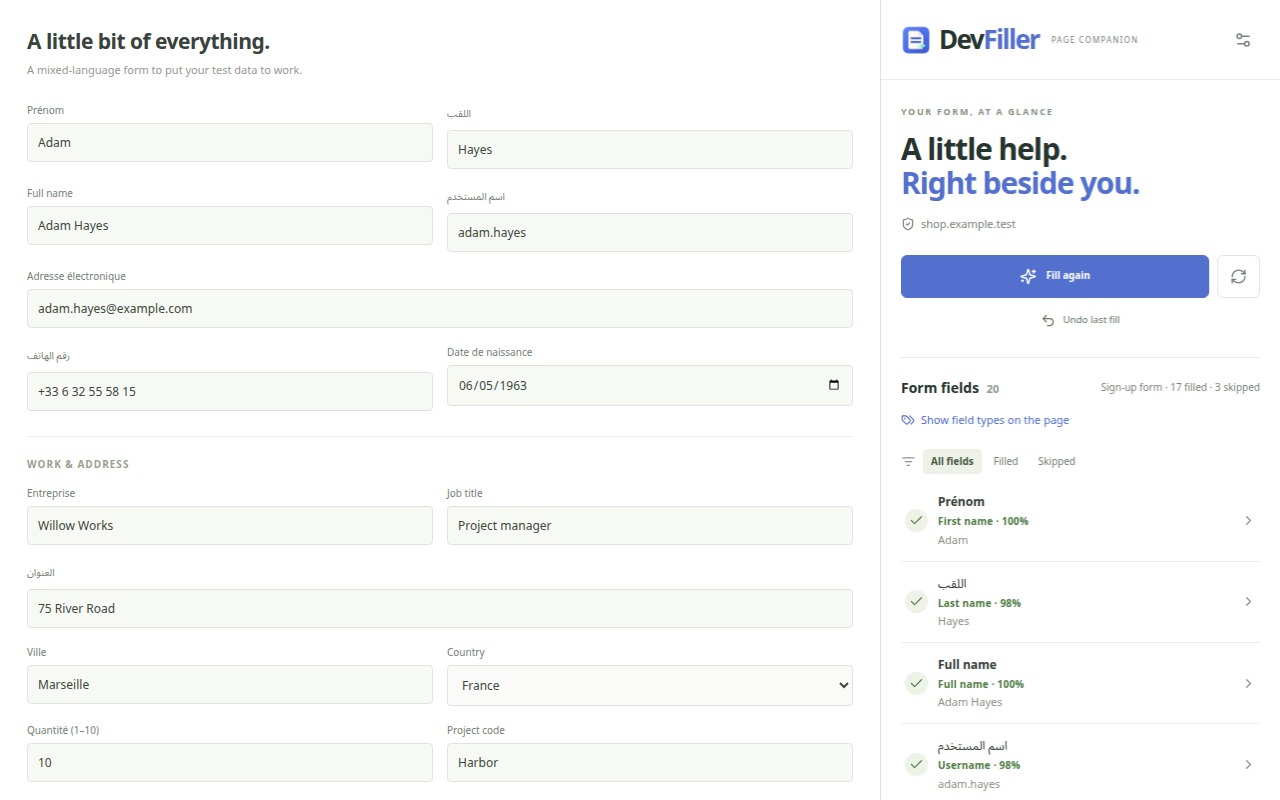
It reads the field before it fills it
DevFiller weighs every clue a field gives and fills it only when the evidence is strong enough. When it isn't sure, it leaves the field unknown rather than guess wrong.
- 1
Read every clue
The label, name, placeholder, autocomplete, units such as (mm) or (kg), and the answers a list offers.
- 2
Score the candidates
Clues that agree add up, clues that contradict push a type down, and close calls stay unknown.
- 3
Read the form
Confirmation fields, start and end dates, card sections and the form's type, from the fields around each one.
- 4
Fit the page
Values follow the field's rules, and a value the site rejects is written another way.
Nothing leaves your browser unless you turn on AI
Settings stay in local extension storage. There is no DevFiller server, account or analytics, and the values you type are never sent anywhere.
If you add your own Groq or Gemini key, only field descriptions (labels, names, placeholders and limits) go to that provider, to suggest values for unusual fields.
Read the privacy policyReviews
What developers and testers say after using DevFiller on their own forms.
Hicham Boucenna
Web Developer
“Very useful extension! It’s saved me a lot of time while testing my web apps, especially when dealing with French and Arabic inputs. Definitely recommend it!”
Islam Mohamed
qa engineer
“DevFiller has made form testing so much faster and easier. The smart data generation and great field detection save me a ton of repetitive work. A really useful tool for developers!”
Questions about DevFiller
Is DevFiller free?
Yes. DevFiller is a free browser extension, open source under the MIT license, with no account, no subscription and no usage limit.
Which browsers does DevFiller work in?
Chrome, Firefox and Microsoft Edge, each from its own extension store. Brave, Opera, Vivaldi and other Chromium browsers install it from the Chrome Web Store. In Firefox, the panel opens in the sidebar.
Does DevFiller submit the form?
No. It fills the fields and stops, so you can check the values and submit the form yourself when you're ready.
What test data does it generate?
Realistic, fictional data for 46 field types: names, usernames, emails at example.com, phone numbers, addresses from one country (the United States, France or Algeria), companies, job titles, dates, numbers and messages. The username and email match the name, and confirmation fields repeat what they confirm.
Does it work with React, Vue and Angular forms?
Yes. DevFiller sets each value the way frameworks notice a person typing, and it also fills custom switches, checkboxes, dropdowns and rich-text editors built with ARIA roles.
Does it recognize French and Arabic forms?
Yes. It reads labels in English, French and Arabic, generates data in any of the three languages, and knows Algeria's 69 wilayas and its communes.
What about passwords, credit cards and one-time codes?
Card fields get sandbox test cards such as 4242 4242 4242 4242, one-time codes get 444444 and bank fields a test IBAN, so anyone can tell they are tests. Password fields stay empty unless you turn on test passwords, and you can exclude any field.
Does DevFiller send my data anywhere?
No. There is no DevFiller server, account or analytics, and settings stay in your browser. Only if you turn on AI suggestions with your own Groq or Gemini key are field descriptions (labels, names, placeholders) sent to that provider.
How accurate is it?
On about 500 real-world forms from public websites (2,500 hand-labelled fields in English, French and Arabic), DevFiller filled 93.5% of the fields with a value that fits them and got 1.9% wrong.
Roadmap
The extension is the first step. Next, the same engine as a package you install in your test suite.
Chrome, Firefox and Edge extension
AvailableOne-click filling, the side panel with undo, custom values, exclusions, English, French and Arabic, and optional AI with your own key. In the Chrome Web Store, Firefox Add-ons and Microsoft Edge Add-ons.
Install itMeasured field recognition
AvailableEvery field scored from all its clues, the form read as a whole, values fitted to the site's validation, custom ARIA widgets, and accuracy measured on forms the engine has never seen.
How it worksRepeatable and regional data
AvailableSeeded fills that give the same data every run, and addresses and phone numbers from the United States, France or Algeria, with the 69 wilayas and real communes.
Generated datadevfiller on npm
In designThe same field detection and data generator as a dev dependency, so your Playwright, Cypress and Vitest suites fill forms with realistic data instead of hard-coded strings.
Read the draftEdge and Firefox
PlannedStore releases for Microsoft Edge and Firefox, once each browser is tested end to end.
Frames and shadow DOM
PlannedForms inside same-origin frames and web components, and scanning only what changed on pages that reveal fields step by step.